guide
By ReclaimLLM TeamSOC 2 evidence for AI coding tools: what auditors ask and how to export it
Seven auditor questions about Claude Code, Cursor, Copilot, and other agents—mapped to control health, populations, exceptions, and SHA-256 evidence packs.
SOC 2 evidence for AI coding tools: what auditors ask and how to export it
Executive summary
- Maps seven auditor questions to evidence ReclaimLLM’s Compliance tab produces (control health, populations/exceptions, evidence pack with SHA-256 manifest).
- Scoped as “helps gather evidence,” not “makes you compliant.” ReclaimLLM’s SOC 2 Type II is targeted for early 2027—not yet certified.
- Control health snapshots run once per org-local day via an hourly poll—not a fixed 02:00 schedule.
- The evidence trail spans control health, access reviews, exceptions, evidence exports, compliance settings, the SIEM webhook, and audit log filters—all exportable for your auditor.
Auditors reviewing a SOC 2 Type II period increasingly ask how you control AI coding tools—Claude Code, Cursor, GitHub Copilot, Codex, and the long tail of CLI agents—not just SaaS logins. They want the same evidence you would show for any system that reads production code, touches secrets, and calls external services: an approved tool list, access reviews, monitoring, retention, and exports a reviewer can verify without reading every prompt.
This post maps seven common auditor questions to concrete artifacts. ReclaimLLM’s Compliance tab helps gather that evidence for your audit; it does not make your company SOC 2 compliant by itself, and ReclaimLLM’s own SOC 2 Type II is targeted for early 2027—not yet certified. Ask your auditor which Trust Services Criteria and sampling approach apply to your engagement; this is operational guidance, not legal or audit advice.
For regulatory context beyond SOC 2, see AI coding compliance and regulatory risks. For discovering unapproved tools before the audit, see Shadow AI coding tools: a CISO checklist.
Why AI coding tools show up in SOC 2 now
Coding agents blur the line between “developer laptop” and “production system.” They read .env files, run shell commands, install MCP servers, and send HTTPS traffic to model providers. The AICPA’s SOC 2 program still evaluates familiar Trust Services Criteria—security, availability, confidentiality—but the population now includes agent sessions, hook coverage, and gateway keys. AICPA has also published notice of proposed 2027 Trust Services Criteria updates (October 2026); standards evolve, so tie controls to what your auditor accepts this period.
Seven questions auditors ask—and evidence that answers them
1. Which AI coding tools are approved, and how do you know others are not in use?
What they want: A defined standard, plus proof of adherence—not a policy PDF alone.
Evidence to prepare:
- Written standard listing approved agents, IDE plugins, and gateway providers.
- Coverage signals showing which tools have ReclaimLLM hooks installed and checking in (coverage alerts).
- Admin Coverage views correlating device check-in with hook integrity.
Pair ReclaimLLM coverage with periodic discovery (EDR, DNS, or interview-based shadow-AI reviews from the shadow AI checklist).
2. How do you stop secrets and sensitive data reaching AI tools?
What they want: Preventive controls at the prompt and tool boundary, plus proof they ran.
Evidence to prepare:
- Hook DLP configuration and file access events showing sensitive reads were blocked or redacted.
- Compliance control RC-AI-02 (sensitive reads and redaction gaps)—population rows reference session IDs and paths, not full prompt bodies.
- Local redaction settings for uploads.
Link technical depth to AI DLP without MDM—coverage is detection, not tamper-proof MDM.
3. Who has access to AI credentials and keys, and when was it last reviewed?
What they want: Periodic access reviews with attestation, comparable to SaaS admin reviews.
Evidence to prepare:
- Access review campaigns in the enterprise dashboard covering gateway keys, org API keys, and members—with decisions such as keep, revoke, modify, or rotate.
- Campaign reports with SHA-256 attestation hashes your auditor can reconcile.
- Compliance control RC-AI-07 tied to review freshness.
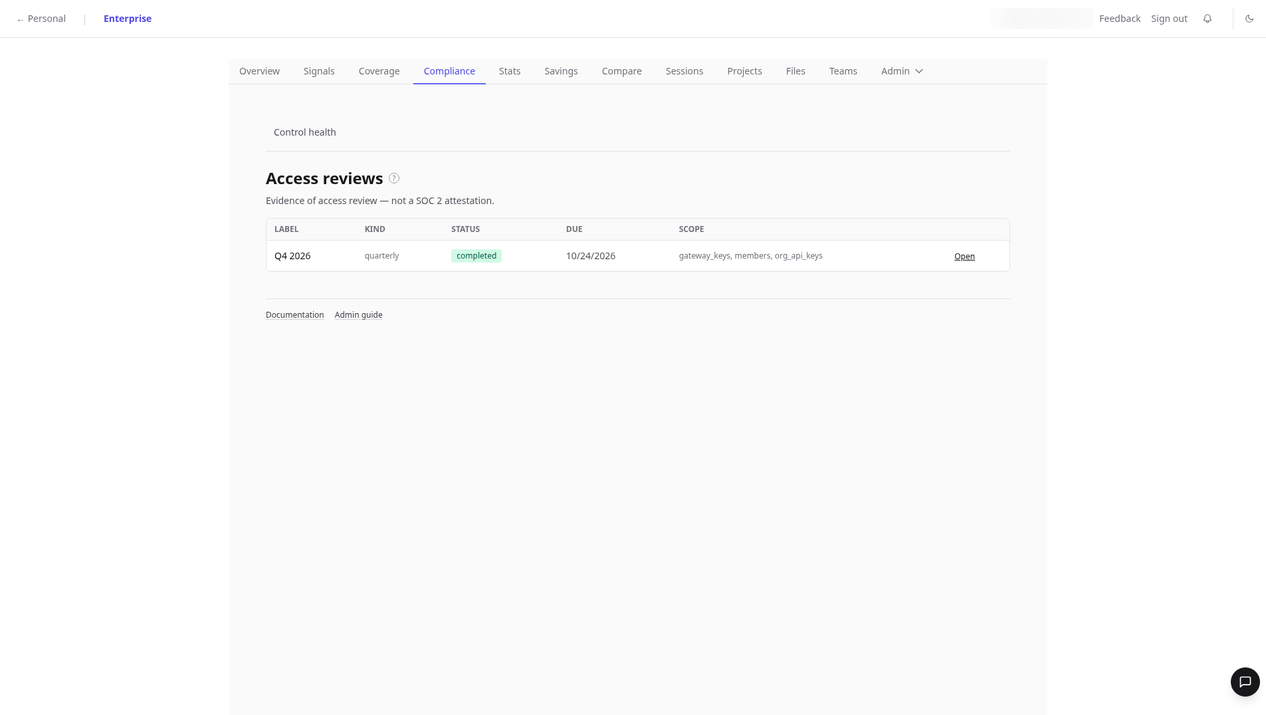
Screenshot API key inventory with masked values (audit log docs).
4. How do you detect misuse or anomalous behavior?
What they want: Monitoring that produces actionable records, not only silent blocking.
Evidence to prepare:
- Signals and anomaly reports (AD-004 P0 email alerts).
- AD-015 external network egress detector where your tool is in scope.
- Project-scoped file lineage for “what files did this session touch?”
Deep dives: AD-004 secret exfiltration and anomalies with evidence.
5. What happens when a control fails?
What they want: An exceptions register and remediation workflow—not a green dashboard with no follow-up.
Evidence to prepare:
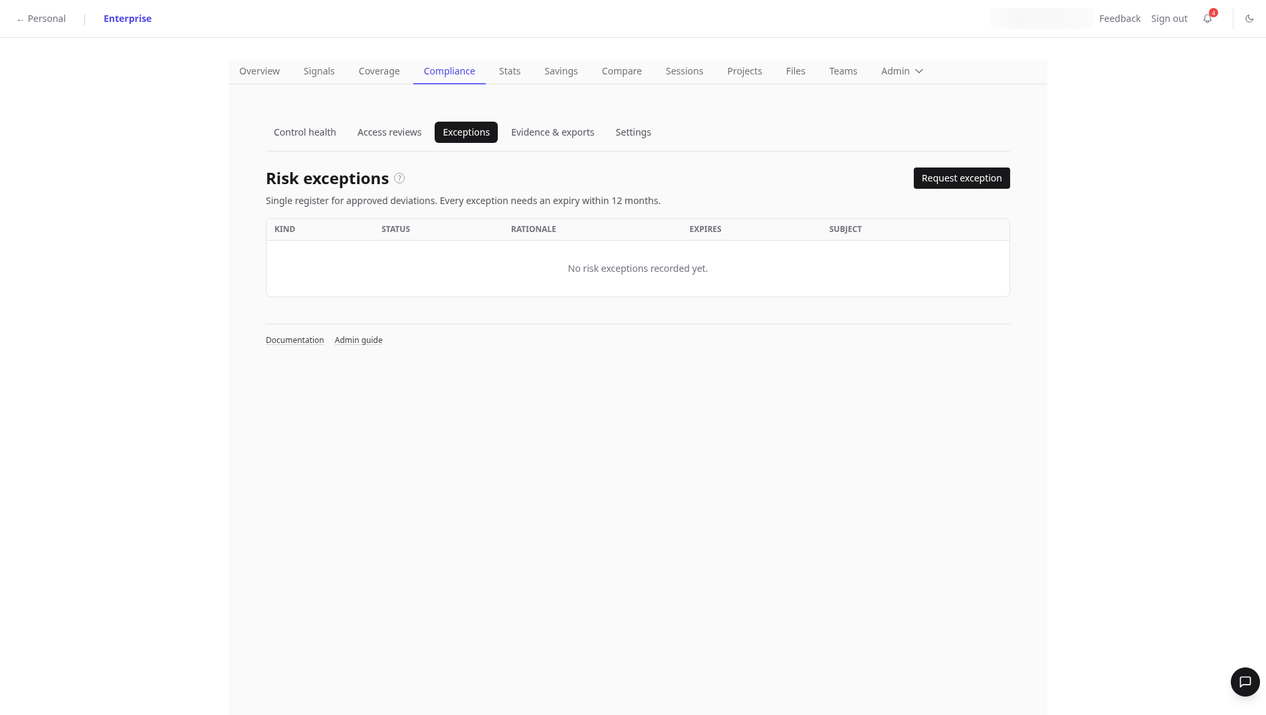
- Compliance exceptions tab with owner, status, and dates.
- Off-cycle campaigns after shared-key exposure or hook removal.
- RC-AI population rows marked as exceptions (for example a “DLP gap” on a
.envread).
6. How long do you keep logs, and are exports tamper-evident?
What they want: Retention within policy and integrity checks on exports.
Evidence to prepare:
- Admin audit log with 365-day retention and CSV export (docs).
- Evidence packs from Compliance → Evidence & exports: CSV bundles plus a SHA-256 manifest (
manifest.csvlisting per-file hashes and a top-level export hash). - Session export via presigned URL when you need a bounded session artifact (session export news).

Do not send auditors full prompt transcripts unless they explicitly require them and your legal team approves—population metadata is usually enough for sampling.
7. Do logs flow to your SIEM?
What they want: Centralized monitoring aligned with your SOC workflow.
Evidence to prepare:
- SIEM webhook configuration (SIEM docs).
- Schema version 1.0, at-least-once delivery, no prompt or message bodies in the webhook payload.
- Sample redacted events and your parser mapping.
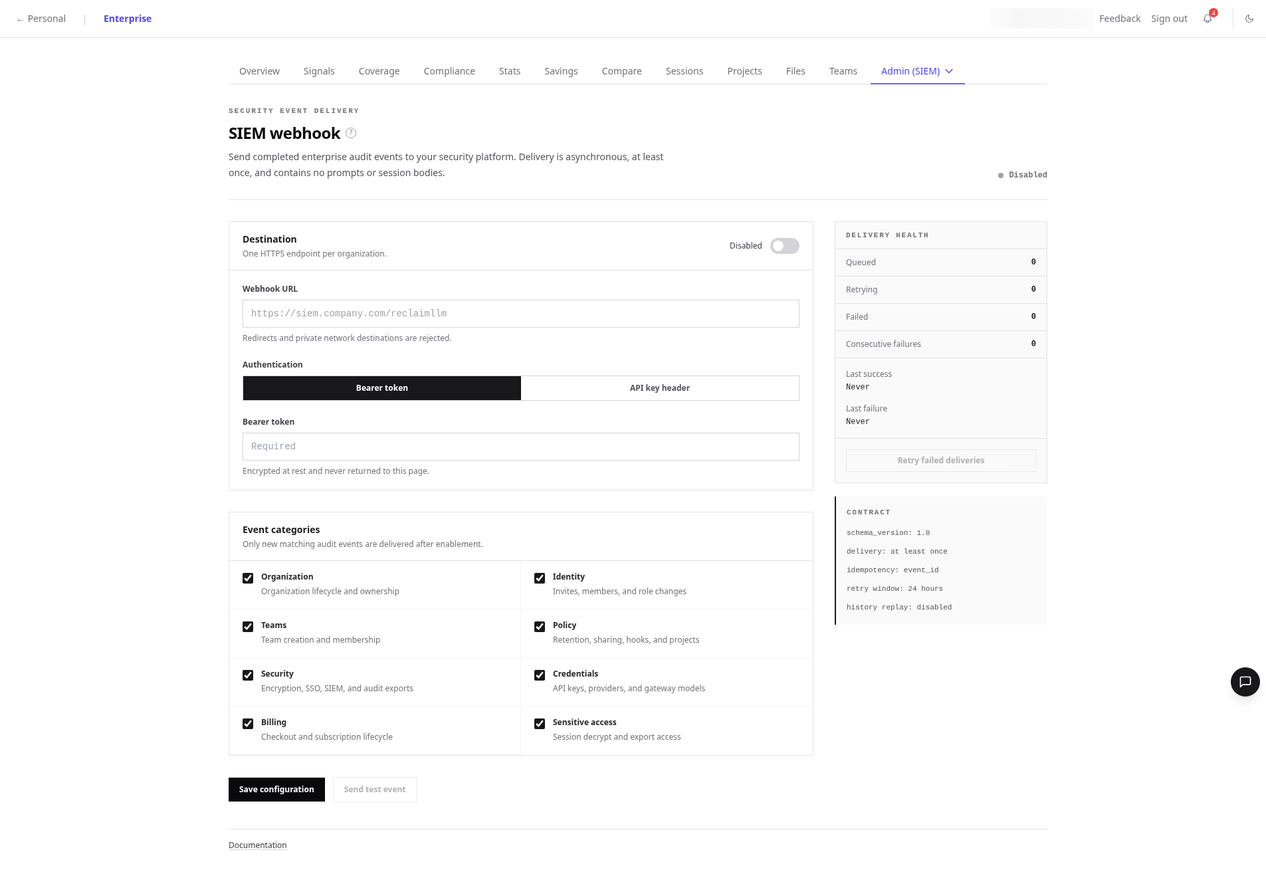
Be precise: ReclaimLLM does not claim SIEM replay or guaranteed delivery to private networks without TLS endpoints your security team approves. Redirects and private-network destinations are rejected.
Populations and exceptions: how sampling works
SOC 2 auditors often sample from a population tied to a control. ReclaimLLM’s Compliance tab evaluates controls such as RC-AI-01, RC-AI-02, and RC-AI-03 (and additional RC-AI controls in the catalog) with statuses pass, fail, warn, or n/a, plus population_count and exception_count on each evaluation.
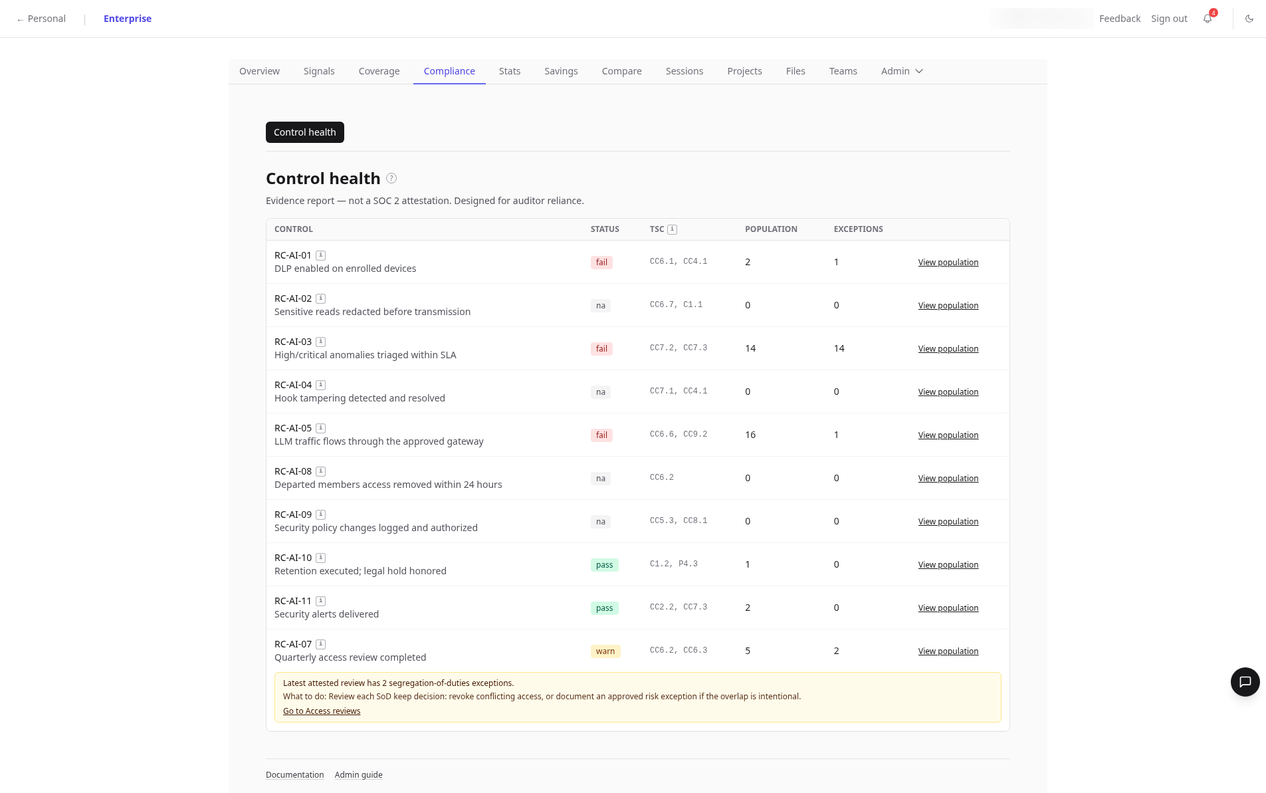
Snapshot cadence: Control health snapshots are computed once per org-local calendar day. A background job polls hourly; when the org’s local timezone crosses midnight, it writes the prior local day’s snapshot. There is no fixed clock time (for example 02:00)—say “daily snapshots” rather than a nightly batch at a specific hour. Default org timezone is America/Toronto unless configured otherwise.
Population entries reference session IDs, file paths, or device facts—not full session content—so you can hand an auditor a row list and drill into only the sampled sessions.
Worked example (RC-AI-02): A population row might show a session ID, a path such as .env, and an exception reason like “DLP gap” when a sensitive read occurred without a matching redaction event. Your auditor selects n sessions from that population; you export the evidence pack for the period and attach session exports only for the sample.
Full tab reference: Compliance admin docs and enterprise Compliance dashboard.
Building the evidence pack
From Evidence & exports:
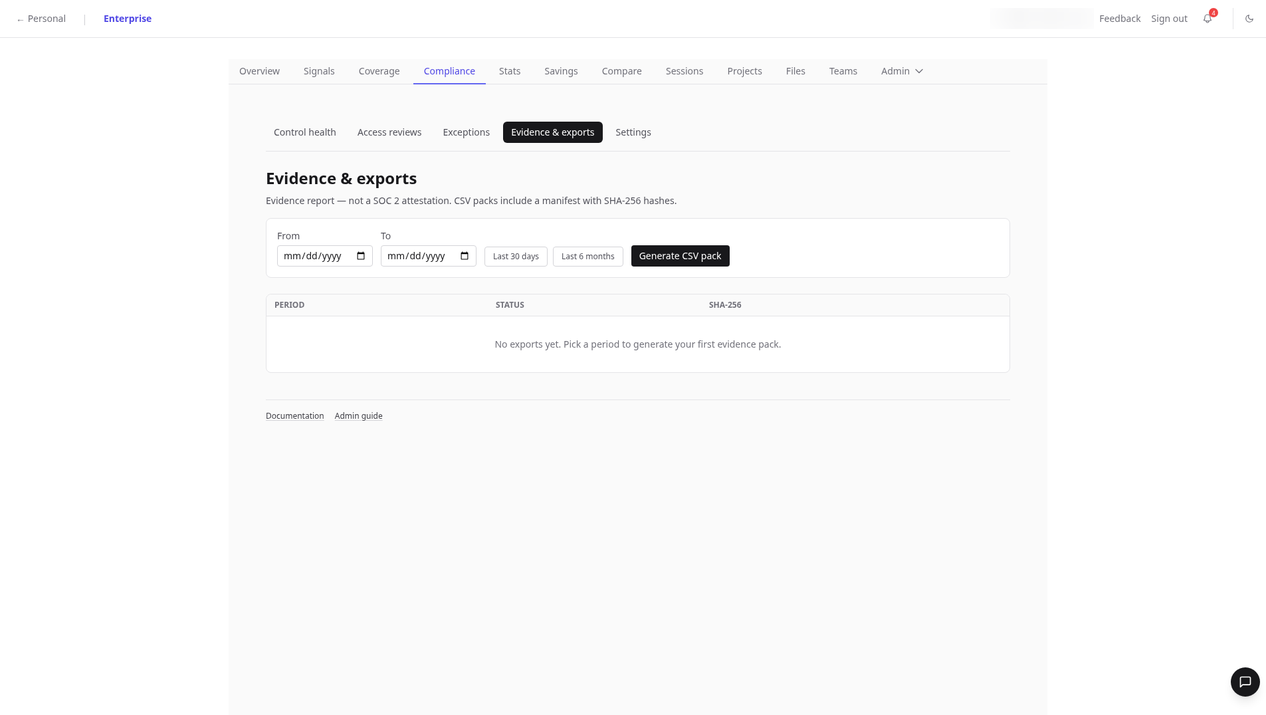
- Choose the audit period (aligned with your Type II window).
- Export CSVs for controls, populations, exceptions, and related audit events.
- Download the bundle manifest with SHA-256 hashes.
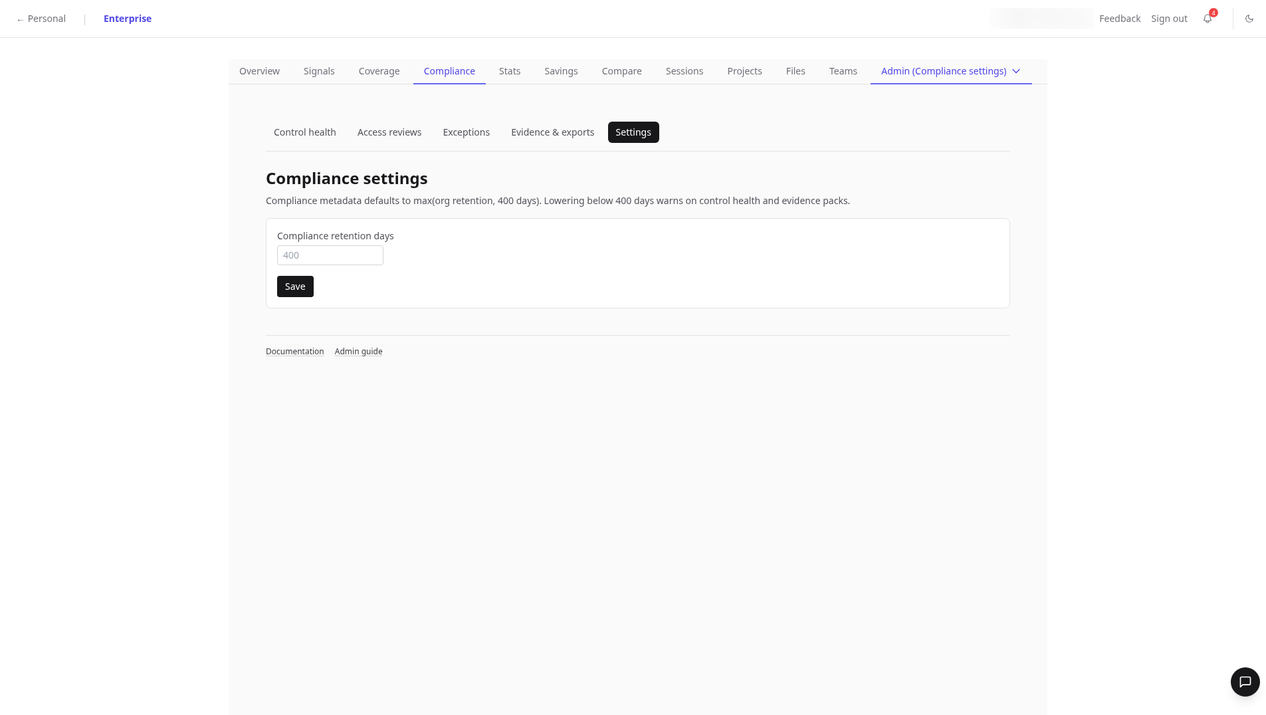
Compliance retention defaults to max(org retention, 400 days); lowering below 400 days warns on control health and evidence packs:
Send the auditor:
- The manifest and CSVs.
- Your written control narratives (ReclaimLLM does not replace your system description).
- Vendor-native logs where required (see below).
Keep out of the zip unless requested:
- Raw prompts, chat bodies, or customer PII unrelated to the sample.
Vendor-native logs to add
ReclaimLLM is not the only log source auditors expect:
| Tool | Typical enterprise evidence |
|---|---|
| GitHub Copilot | Enterprise audit log events for Copilot-related activity |
| Claude Code | Managed settings deployment proof plus Anthropic admin or console logs where your contract includes them |
| Cursor | Cursor Team/Enterprise admin audit features—verify current SKU docs before audit season |
ReclaimLLM fills gaps across agents (hooks, file access, sessions); vendor logs prove their admin actions and entitlements.
What ReclaimLLM is—and is not
ReclaimLLM helps your team collect and export evidence about AI coding tool usage: control evaluations, populations, exceptions, access reviews, audit logs, and SIEM-friendly events. It does not:
- Certify your organization as SOC 2 compliant.
- Replace your auditor’s judgment or TSC mapping sign-off.
- Guarantee every developer machine is in scope without coverage monitoring.
Developers do not see the Compliance tab—plan who owns exports (security, GRC, or platform engineering).
ReclaimLLM hosts customer data in US and EU regions. ReclaimLLM’s SOC 2 Type II is targeted for early 2027 and is not yet certified.
Pre-audit checklist (copyable)
| # | Task | Owner | Done? |
|---|---|---|---|
| 1 | Written AI coding tool standard approved | Security | |
| 2 | Hooks installed; Coverage tab reviewed | Platform | |
| 3 | RC-AI controls green or exceptions documented | GRC | |
| 4 | Access review campaign completed (keys + members) | IT | |
| 5 | Audit log retention confirmed (365 days) | GRC | |
| 6 | Evidence pack exported with SHA-256 manifest | GRC | |
| 7 | SIEM webhook tested (schema 1.0) | SecOps | |
| 8 | Vendor Copilot/Claude/Cursor logs attached | IT | |
| 9 | Legal sign-off on what leaves the boundary | Legal |
Next step: Export your AI coding evidence pack—book a demo. Read the Compliance documentation for tab-by-tab detail.
FAQ
Do SOC 2 auditors ask about AI coding tools?
Increasingly yes—especially when developers use agents that read repositories and run commands. Expect questions on approval, data handling, access reviews, and monitoring.
What evidence shows AI coding tools are controlled?
A control list, populations per control, an exceptions register, hook coverage proof, access review attestations, audit logs with retention, and hash-verified exports. ReclaimLLM’s Compliance tab produces several of these artifacts; your policies and vendor logs complete the picture.
Do we need audit logs for Claude Code or Copilot?
Often yes for enterprise engagements covering those products. Pair vendor audit logs with cross-tool session and file-access evidence from ReclaimLLM so sampling is coherent.
How do access reviews apply to AI API keys?
Treat gateway keys, org API keys, and membership like other privileged credentials: periodic campaigns with keep/revoke/modify/rotate decisions and an attested report hash.
Is ReclaimLLM SOC 2 certified?
Not yet. ReclaimLLM’s SOC 2 Type II is targeted for early 2027. Using ReclaimLLM does not transfer certification to your organization.